
Know which marketing turned into revenue.
Tag every link you share and Janus follows each prospect from that click to the request, the won deal and the finished job.
Add what you spent and see your cost per job and your return on every channel.
On every Janus plan.
Clicks aren't jobs
Your ad dashboard stops at the click. It shows clicks and calls. It can't tell you which of them turned into a $3,000 job.
Everything looks "direct". A prospect sees your flyer, types your address in later, and your analytics has no idea the flyer did it.
Budget by gut. Without numbers from ad to finished job, every "should we keep running this?" is a guess.
What source attribution means
Source attribution is knowing where each customer came from: a Google ad, a Facebook post, a flyer on a community board, your Google Business Profile, a referral from a past customer.
ROI, return on investment, takes it one step further: for the money you put into each of those, how much paid work came back?
Without attribution, you know you got 40 requests last month. With it, you know 18 came from Google Ads, 12 from your Google profile, 6 from Facebook and 4 from a flyer, and which of them turned into jobs.
How it works
- Make a campaign link for each place you advertise. In Janus, open Settings, then Leads & doors, then Campaign Links. Pick where people will see it: a Facebook or Instagram post or ad, your Google Business Profile, an email, a text, Nextdoor, YouTube, a partner or directory, or a yard sign, truck or flyer. Choose the month, the service and the offer, and Janus builds the link. For print, download a QR code.
- Janus remembers where each prospect came from. When someone opens your front door from that link, Janus records the source, the medium and the campaign. If they leave and come back later in the same browser, Janus still knows the first source, for up to a year, and records the latest one too.
- The source stays with the lead. It follows the request into the deal, and from the deal to every job it produces. Archive the request and the job still shows where the customer came from.
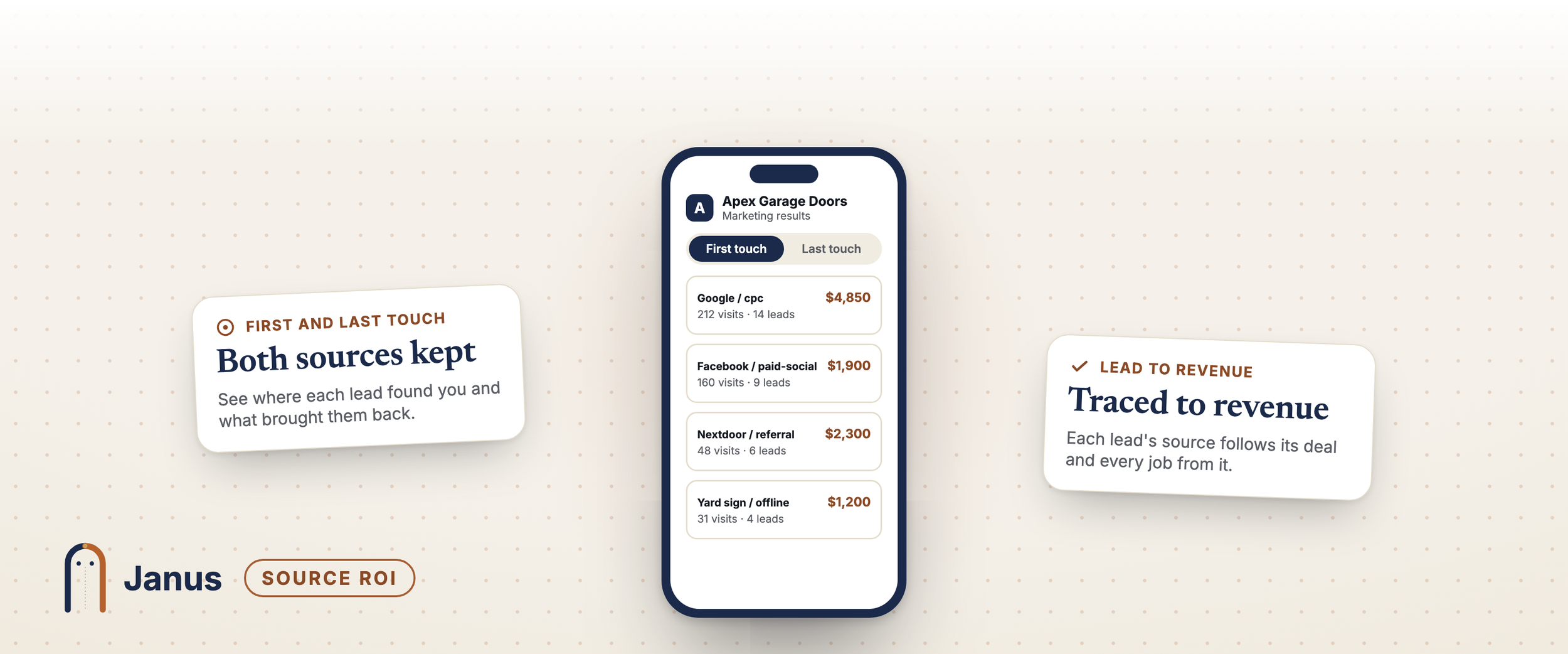
- See the money by campaign. Open Reports, then Marketing results, then Revenue. For each campaign: visits, leads, deals won, the value of open quotes, money earned from finished jobs, money booked for scheduled ones, and what you kept.
Google Ads needs no link. Leave Google's auto-tagging on and Janus labels those leads Google ad.
Add your spend, see your return
Enter what you spent on each channel, by month. Janus works out, for each channel and for all of them together:
- Cost per lead
- Cost per job
- Return on ad spend
- What you kept for every $1 spent, once your jobs have their costs in
Paid and unpaid, kept apart
Google ad and Google search are separate lines, so the money you spend on ads is never measured against customers who found you for free. Unpaid search has its own line, with no spend and no return figure.
First touch and last touch
Janus keeps two sources on every lead: where the prospect first found you, and the last place they came from before reaching out. The report has a switch between First touch and Last touch, so you see both, even when someone looks around for days before sending a request.
Why it matters
For you, the owner
- Stop paying for what doesn't work. If $500 a month on Facebook brings in one small job and $500 on Google brings in eight, you'll want to know.
- Spend more on what does. When a channel keeps turning into paid work, you can put more behind it with confidence.
- Count jobs, not clicks. A channel with lots of cheap leads that never book can cost you more than one with fewer, better customers.
- Decide with numbers. "I think the flyers are working" becomes "the flyers brought in three jobs worth $4,200 last quarter."
For your agency
- Results in your money. Instead of clicks and impressions, an agency can show which campaigns brought in won jobs and revenue.
- Same numbers for both of you. An agency managing your Janus account sees revenue by source, medium and campaign, with sessions, conversion rate, cost per lead, closed revenue and booked pipeline.
- A report to hand over. Download a performance report as a PDF or a Word file for the next budget conversation.
Keep your links tidy
- Every link in one list. Each campaign link shows where it's used and how many leads, booked jobs and won deals it has brought in. Owners and admins also see its revenue and margin.
- Printed a QR code? Make it a short link and you can point it at a new page later without reprinting. Scans are counted.
- Test two versions. Give two ads their own version of a link and compare what each one earned.
- Fix messy tags. Tags that don't match your usual names show under Needs cleanup. Map one to the right source and past leads are fixed too.
- Your pixel still fires. After someone submits your request form, Janus can send them to a thank-you page on your own website, so your Google or Meta tracking records the conversion.
Your Revenue screen also breaks money down by the source that first brought each customer in. See the Job & Revenue Tracker.
Good to know
- Visits with no tags. Janus reads where the visitor came from: a visit from Google or Bing shows as Google search or Bing search, and one from another website shows as a referral. With nothing to go on, it shows as Direct / unknown. Janus doesn't guess.
- Most phone calls don't carry a source. If your AI assistant takes a call from a number that already sent you a web request, the call gets that earlier source. Any other call shows as Direct / unknown.
- A new device starts fresh. The first source is remembered in the same browser for up to a year. A different phone or a cleared browser counts as a new visitor.
- Spend is monthly. A date range that covers part of a month counts that whole month's spend.
- Who sees it. Marketing results and ad spend are for the account owner and admins. Anyone on your team can make a campaign link.
What it doesn't do
- It doesn't give each ad its own phone number. There is no call tracking by ad.
- It doesn't connect to Google Ads, Meta or Google Analytics. You type your spend in, and your pixel fires on your own thank-you page.
- It doesn't follow people across devices.
- It doesn't track visits to your own website. It tracks who reaches your Janus front door, and what they turn into.
Source and ROI questions
What is source attribution?
Knowing where each customer came from. When a prospect asks for a quote, attribution answers one question: what made them reach out? A Google ad, a Facebook post, a flyer, your Google Business Profile or a referral.
Do I need to add code to my website?
No. You put a campaign link behind your website button, in your ads, in your social posts and on your Google Business Profile. Janus does the rest.
What's a campaign link?
Your front door's address with a tag for where you shared it. Use a different one for each ad, post or flyer, and Janus can tell them apart.
Do I need a campaign link for Google Ads?
No. Leave Google's auto-tagging on and Janus labels those leads Google ad. Microsoft ads are labelled the same way.
Can I use my own UTM tags?
Yes. Any link to your front door carrying source, medium and campaign tags is recorded. Tags that don't match your usual names show under Needs cleanup, where you can map them to the right source.
What's the difference between first touch and last touch?
First touch is where the prospect first found you. Last touch is the last place they came from before reaching out. Janus keeps both on every lead and the report has a switch between them.
Does it track phone calls?
Only in one case. When your AI assistant takes a call from a number that already sent a web request, the call carries that earlier source. Janus doesn't give each ad its own phone number, so other calls show as Direct / unknown.
Will my Google or Meta conversions still be counted?
Yes, if you send people to a thank-you page on your own website after they submit. Your pixel fires there. Janus does not send conversions to Google or Meta itself.
How do I track a lead from its marketing channel to a booked job?
Use a campaign link everywhere you advertise, and leave Google's auto-tagging on for Google Ads. When a prospect sends your request form, Janus saves the source on the lead. That source follows the lead to its deal and every job from that deal. Open Reports, then Marketing results, then Revenue to see leads, deals won and revenue by campaign.
Is there a tool that connects ad spend to revenue for a service business?
Yes. In Janus you enter what you spent on each channel by month. Janus then shows cost per lead, cost per job and return on ad spend. Add labor and materials to completed jobs and it also shows what each channel kept after ad spend. The results are strongest for form leads, because most phone calls don't carry a source.
Is it on every plan?
Yes. Campaign links and Marketing results are on every plan.
Stop guessing which channel is working.
Give yourself the numbers you need at budget time.