
Replace your contact form with one prospects actually finish.
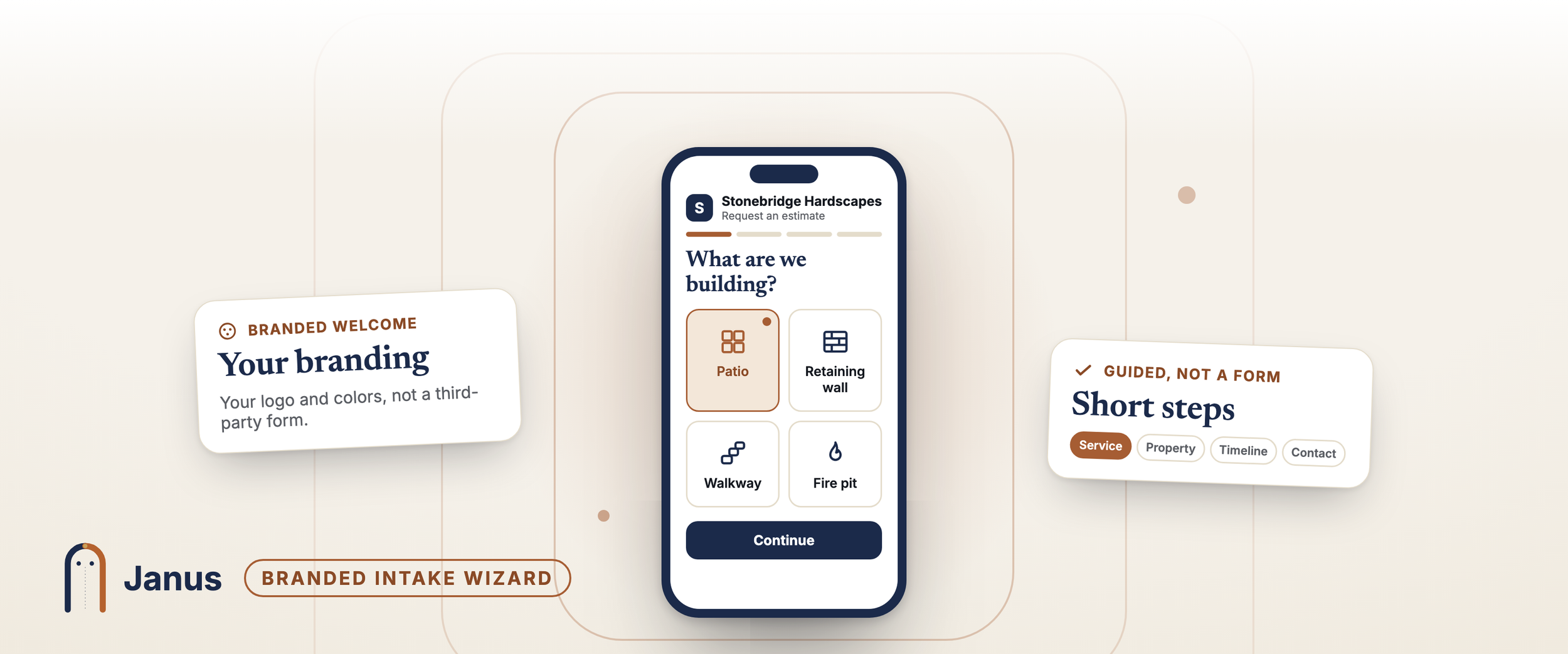
A short, step-by-step request form with your logo, your color and your questions. Every request lands on your board as a deal.
And when someone starts the form and stops, Janus saves what they typed so your team can follow up.
On every Janus plan.
A contact form gives you an email. Then what?
"Name, email, message" tells you almost nothing. You call back to ask what they need, when they need it and where they are. Half the time they don't pick up.
And the people who gave up halfway through your form? You never hear about them at all.
What the prospect sees
One question or two at a time, with big buttons that work on a phone. A new sales form asks for:
- What they need. They tap the services they want from your own list.
- How to reach them. Name, email and phone.
- Where the work is. Home or business, and the address. If customers come to you, switch this off.
- The details. What's going on, how soon they need it, and up to 5 photos.
- How they heard about you.
- How they'd like to be contacted, with a box to tick if they agree to texts.
Then they see your thank-you message and, if you've set up scheduling, a time to book. They get a confirmation by email, and by text if they ticked the box.
The form has an EN | ES switch, so a prospect can read Janus's wording in Spanish.
Make it yours
Your logo and color
Upload your logo and pick your brand color once. They show on the form, the welcome page before it and the booking page after it.
Your wording
Change any heading, question or answer choice so the form sounds like your business. Every field starts with sensible wording, so there's nothing you have to write first.
Your own questions
Add pages and questions for your kind of work: make and model, number of rooms, the date of the event. Choose short text, a paragraph, yes or no, a dropdown, radio buttons, a number or a date, and mark any of them required.
Questions that show only when they apply
Show a page or a question only when an earlier answer calls for it. Ask "In person or virtual?" and show the address page only for in person.
Only the steps you need
Switch off steps you don't want, such as property type or "How did you hear about us?". Make the phone number optional. Offer only some of your services on one form.
See it before prospects do
The editor shows a phone preview beside your changes, and Preview opens the form as a visitor sees it without saving what you enter.
When someone doesn't finish
Janus saves what they typed
Once a visitor has entered a name and an email or a phone number, Janus keeps their answers. If they haven't sent the form about 20 minutes later, they show under Unfinished forms in your Inbox.
Your team follows up
Open one to see what they got as far as telling you. Tap Work this to turn it into a deal and call or email them, or dismiss it. Janus doesn't contact them for you.
It's on from the day you sign up, on every plan. You choose how long unfinished forms are kept: 30, 60, 90 or 180 days, or until you delete them.
What your team gets
- A deal on your board, not an email to file. The request opens a deal at New with the contact, the services, every answer and the photos.
- An alert right away. The people who get your new-lead alerts are told by text, email or push notification.
- A score on sales requests. Janus rates each one Hot, Warm or lower from how soon they need the work, the services they picked, the property type and where they came from, so you can call the best lead first.
- Where they came from. Give each ad, listing or flyer its own tracking link and the deal shows which one sent it.
- A reminder if it sits. If a deal is still at New after 48 hours, your team gets a reminder.
One form for each kind of request
Not everyone who contacts you wants a quote. Each front door has its own form, and you choose what kind it is.
Sales
New work. Requests are scored and go on your sales board.
Service
Existing customers who need help. Requests go on a service board: New, Open, Closed.
Hiring
Job applicants, tracked from Applied to Hired.
Submissions
Anything else, such as supplier or sponsorship requests: New, Reviewed, Archived.
Starter includes 5 front doors, Pro 10 and Multi-location 21. See how front doors fit together.
Setup
- Add your logo and color. Under Settings, then Business, then Brand.
- List your services. These are the choices prospects tap on the first step.
- Edit the form. Under Settings, then Leads & doors, then Front doors, tap Edit door. Change the wording, switch steps on or off, and add your own questions on the Questions tab.
- Preview it, then save and publish.
- Put the link where people find you. Paste it behind the "Get an estimate" or "Contact" button on your website, on your Google Business Profile and in your social pages. Download a QR code for signs and flyers.
To offer a time to book after the form, let customers book with Janus or use your own link from Calendly, Acuity, Squarespace Scheduling, Cal.com, Outlook Bookings or HubSpot Meetings.
Rather have it built for you? See done-for-you setup on the pricing page.
What it doesn't do
- It doesn't embed in your website. The form is its own page. Your website links to it.
- It doesn't use your own web address. The address starts with app.myjanus.pro.
- It doesn't chase unfinished forms for you. Janus shows them to your team. Your team makes the call.
- It doesn't translate what you write. Janus's own wording switches to Spanish. Your wording and your questions show as you wrote them.
- It doesn't text people who didn't agree. No tick, no text. They still get the email.
One thing to know: the thank-you screen on a sales form shows a small ad block unless you turn it off under Settings, then Reviews, then Ads.
Request form questions
How is this different from a contact form?
A contact form sends you an email. This form asks a few short questions one step at a time, then puts the request on your board as a deal, with the service, the details, photos and how they found you.
Can I add my own questions?
Yes. Add your own pages and questions to any form: short text, a paragraph, yes or no, a dropdown, radio buttons, a number or a date. You can make a question required.
Can a question show only for some people?
Yes. A page or a question can show only when an earlier yes/no or choice question got a certain answer. For example, ask for an address only when the visit is in person.
Can prospects send photos?
Yes. Every request form lets them attach up to 5 photos (JPEG, PNG or WebP, up to 10 MB each). The photos are saved on the deal.
What happens if someone starts the form and stops?
Once they've typed a name and an email or a phone number, Janus saves what they entered. About 20 minutes later it shows under Unfinished forms in your Inbox, so your team can follow up.
Does the form go on my website?
It's a page of its own. You put its link behind the button on your website, your Google Business Profile, your social pages or a QR code. There is nothing to install, and it can't be embedded inside another page.
Can it use my own web address?
No. The form's address starts with app.myjanus.pro, followed by your business's name. The page itself shows your logo, your brand color and your wording.
Does the prospect get a confirmation?
Yes. They always get an email. They also get a text if they ticked the box agreeing to texts. The box starts unticked.
Is the form in Spanish?
The form has an EN | ES switch, and Janus's own wording is translated. Wording and questions you write yourself show as you wrote them.
Do I have to ask for a phone number or an address?
No. Both are settings. The phone number starts required and you can make it optional. If customers come to you, turn off the property questions and the form skips them.
How many forms can I have?
Each front door has its own form: 5 on Starter, 10 on Pro and 21 on Multi-location. Tracking links for your ads are unlimited on every plan.
How does it stop spam?
The form runs an automatic bot check, limits how many requests one sender can make in an hour and a day, and drops a repeat of the same request sent within 10 minutes.
Get the whole request the first time.
Your questions, your brand, and every request on your board.