
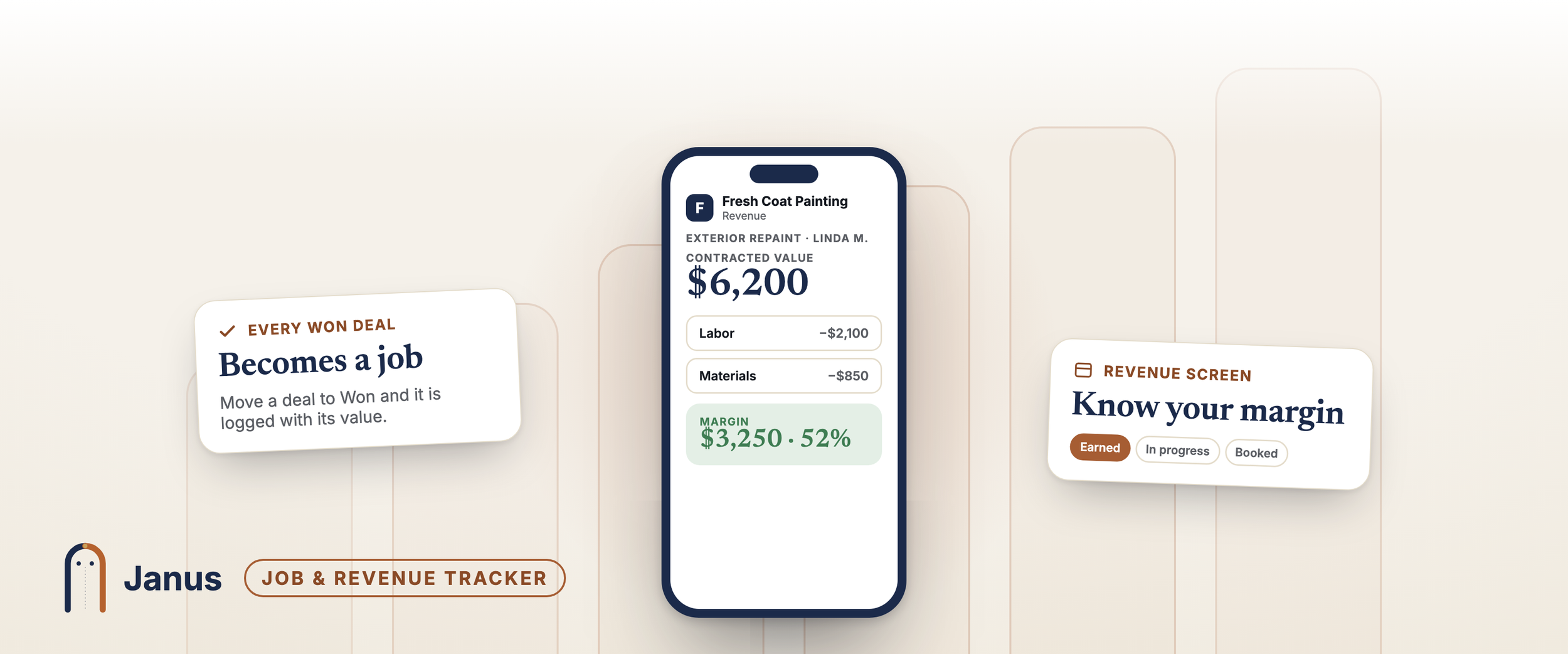
Know what every job brings in, and what it leaves you.
Win a deal and Janus turns it into a job. Track its costs as the work runs, get paid through your own Square or Stripe account, and see it all add up to revenue and margin.
On your phone, without a spreadsheet.
On every Janus plan.
Revenue, at a glance
- Earned: completed jobs
- In progress: started, not finished
- Booked: scheduled work still to come
- Profit margin: in dollars and as a percent
From lead to won job, in under two minutes
Every lead from a missed call, web form or AI Voice lands on your pipeline. Win the deal and it becomes a job you can track to revenue and margin.
Busy isn't the same as profitable
The paper trail. A job's value lives on a handwritten estimate or in a text thread, not anywhere you can add it up.
The month you can't see. You don't know how the month went until the books are closed weeks later.
The guessed margin. Without costs tied to the job, "was that one worth it?" stays a gut feeling.
How it works
- A won deal becomes a job. Mark a deal Won and Janus creates the job, with the customer, the value, the assigned person and the service carried over. Not every job starts as a deal, so you can record one by hand too.
- Each job has a status. Scheduled, In progress, Completed or Cancelled. Revenue splits the money the same way: Earned, In progress and Booked.
- Track costs as the job runs. Your crew times the work and their time goes on the job as labor. Add materials and anything else line by line.
- Get paid. Text your customer a pay link, take a deposit and then the balance, or mark a cash or check payment. Janus marks the job paid when the money comes in.
- Watch it add up. Revenue by month, quarter or year, and broken down the ways you ask about it.
Costs, line by line, and the crew's time
List what the job cost
Open a job and tap Add a cost: the parts, the rental, the disposal fee. Each line is Labor or Materials, with what it was for and the amount. The job's totals add themselves up. Or just type one labor figure and one materials figure.
Let the crew time the work
On the Calendar, whoever is on the visit taps Start timer when they begin and Stop timer when they're done. Each stretch becomes a labor line, such as "Timer: Terry, 1 hr 30 min", at that person's hourly rate. Marking the visit done stops any timer still running.
You set the rates
The account owner and admins enter each team member's hourly rate once, under Settings, then Team. Your crew sees their own timer and how long it has run, never the rate or the cost.
See what you kept
Janus shows your profit margin in dollars and as a percent, and tells you how many jobs it's based on. It's what's left after labor and materials, before your overhead.
Get paid through your own Square or Stripe
Connect the account you already have. The money goes straight to you, and Janus takes no cut.
- Text a pay link. Tap Request payment on a job, choose the balance or a deposit, and text the link. The customer pays on Square's or Stripe's own page.
- Take a deposit, then the balance. The job shows what's paid and what's still due.
- Charge in person. With Square, charge the card from your phone using a Square Reader or Tap to Pay.
- Cash or check. Mark the job paid another way.
- Paid on its own. When the money comes in, the job shows Paid, and the people you choose get an alert. A refund you make in Square or Stripe comes off the job too.
- Tips. Tips are counted on their own, by person, and kept out of Earned.
You connect Square or Stripe, not both. Charging in person is Square only.
Answers to the questions you actually ask
- Which services make the money? Revenue by service type.
- Did that ad pay off? Revenue by lead source: the campaign link or ad that first brought the customer in, or how they said they heard about you. See what you kept from each source, not just what it brought in.
- Who's bringing in the work? Revenue by team member.
- Which location is doing best? Revenue by location, once you have more than one.
- Who are my best customers? Your top 10 customers by revenue, and each customer's lifetime value on their record.
- What's my average job worth? Average job value for completed jobs.
- Which jobs were worth it? What you kept on every job with its costs in.
Tap a bar to see the jobs behind it. See which marketing pays: Source ROI.
Nothing falls behind
Overdue
Jobs that are scheduled or in progress but past their date, listed right under your totals.
Coming up
The work you've booked for the next 7 and 30 days, and what it's worth.
Paid or unpaid
Every job in the list shows whether it's paid, part paid or unpaid.
Who changed what
A log of recent job changes, with who made each one and when.
Pick any date range. Today, the last 7 or 30 days, this month, this quarter, the year so far, your whole history, or your own dates. Export any time. Download your jobs as a spreadsheet for your bookkeeper.
Your numbers stay with the people who should see them
Revenue, profit margin, job prices, costs and hourly rates are for the account owner and admins. The rest of your team works the pipeline, their visits and customers. They can time their work and take a payment on their own visit without seeing your numbers.
What it doesn't do
- It doesn't send invoices or write quotes. It texts a pay link and tracks what's paid.
- It doesn't run payroll. The timer costs a job. It isn't a timesheet system.
- It isn't accounting software, and it doesn't connect to QuickBooks. Keep doing your books where you do them, and export your jobs when you need them there.
- It doesn't count overhead. Margin is what's left after labor and materials.
- It doesn't set up repeating jobs. Each job is recorded once.
Job and revenue questions
Can I send invoices from Janus?
No. Janus tracks what each job is worth, what it cost you and whether it's paid. You can text a customer a link to pay, but invoicing stays in the tool you already use.
Does a won deal become a job on its own?
Yes, when Won deals become jobs is switched on, which it is on a new account. The job starts as Scheduled with the customer, the deal's estimated value as its quoted price, the assigned person and the service. You can also record a job by hand.
Do I have to enter costs?
No. Costs are optional. A job without costs still counts toward your revenue; it just isn't in the profit margin figure, and Janus tells you how many jobs the margin is based on.
How does the crew timer work?
Whoever is on a visit taps Start timer on the Calendar when they begin and Stop timer when they finish. The time goes on the job as labor at their hourly rate. Marking the visit done stops it too.
Can customers pay through Janus?
Yes, through your own Square or Stripe account. Text a pay link for the balance or a deposit. With Square you can also charge in person from your phone. Cash or check? Mark it paid another way.
Does Janus take a cut of payments?
No. Janus takes no cut. Square or Stripe charge their usual card fees, at your rates.
Can I use Square and Stripe together?
No. You connect one or the other.
Can my team see our revenue?
Revenue, profit margin, job prices, costs and hourly rates are for the account owner and admins. Everyone else can see the estimated value on a deal, but not the Revenue screen.
Can I get the numbers into my accounting software?
Export your jobs as a spreadsheet file any time, with prices, tips, costs, lead source and margin for each job. Janus does not connect to QuickBooks directly.
Is it on every plan?
Yes. Jobs and Revenue are on every plan. Revenue by location shows once you have two or more locations.
Stop closing the month on guesswork.
See what every job brought in, what it cost and what's still owed.